Reach by ChannelPro
Multi-surface B2B platform UX — incentive systems, admin architecture, and mobile field experience for indirect sales channels
Four surfaces, one system: internal admin web, client web, client mobile, and salesperson mobile
Incentive & rewards engine: manual founder setup → client self-service program building
Engagement layer: in-app banners, news, surveys, lead gen, automated email with performance stats
Admin-heavy operations: entity management, role-based permissions, CSV bulk import, real-time reporting
Client
ChannelPro (Reach)
Sector
B2B SaaS
Channel Sales Technology
Discipline
UX Design
Product Strategy
Workflow Design
Incentive Systems
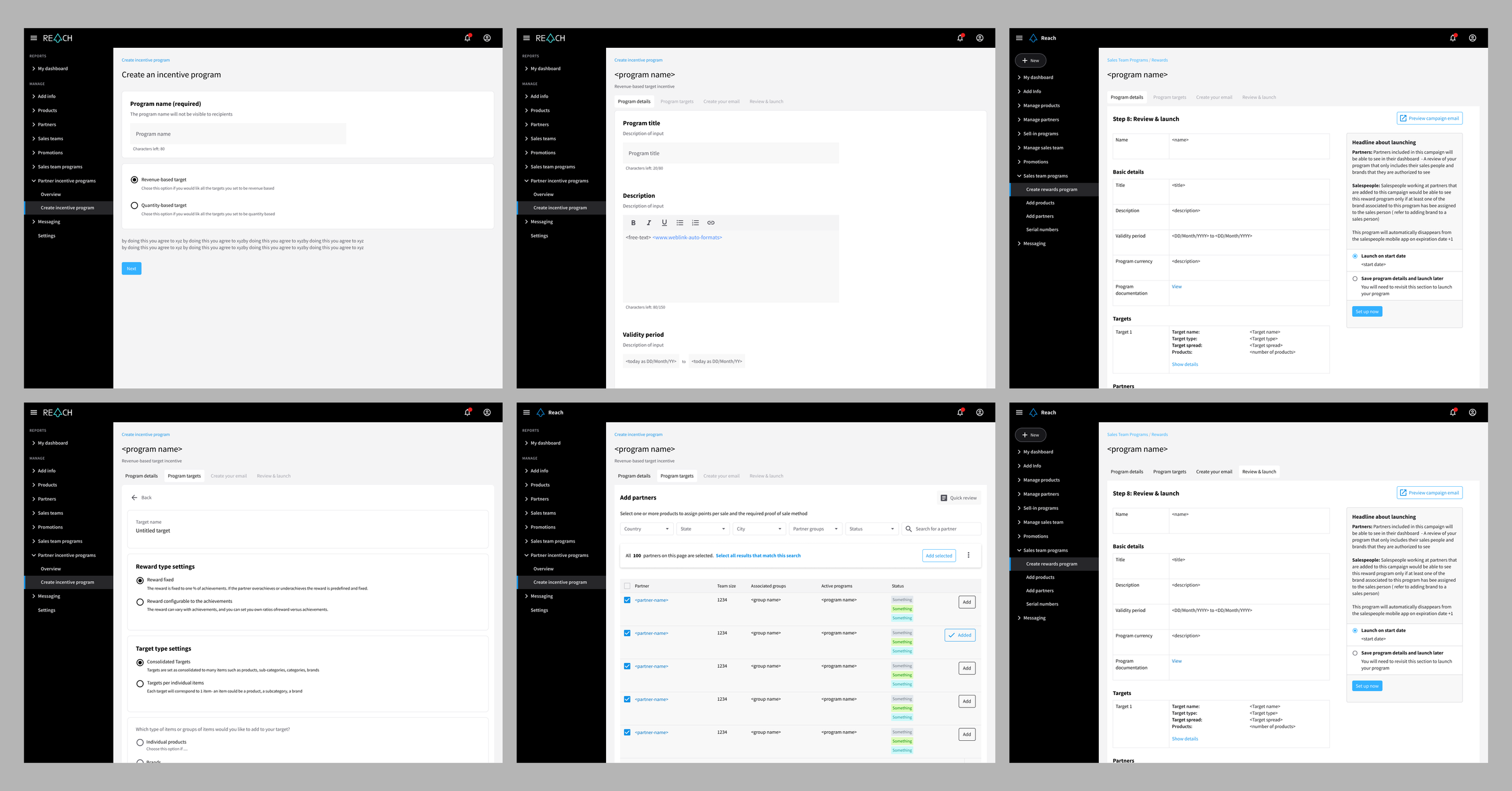
Add and manage Incentive Programs
Context
Reach is a B2B SaaS platform connecting brands directly to the indirect salespeople selling their products — distributors, resellers, and frontline sales teams. I joined the founding team in a product strategy role (Jan 2022–Apr 2024), working directly with the CEO to design the platform across four surfaces: an internal admin web app, a client-facing web app, and two mobile apps (client and end-user/salesperson) covering reporting, training, loyalty, and redemption.
Scope spanned product and client databases, incentive and rewards systems, CSV-based bulk import, real-time reporting and performance dashboards, in-app content (banners, news, surveys), lead generation, automated email/messaging with performance stats, and full admin/client/salesperson permission layers. The work was part of the team's acceptance into the Flat6Labs accelerator.
The challenge
The core challenge wasn't visual polish — it was making a genuinely complex, multi-sided system legible and operable:
Four distinct surfaces (admin, client web, client mobile, salesperson mobile), each with different goals but one shared data and design system
Incentive-program setup that ran entirely through a single non-technical founder — a bottleneck capping how fast partners could onboard and how much program detail could be captured
Multiple user types with different permissions, responsibilities, and mental models
Data-heavy admin surfaces (partner lists, sales reports, bulk imports) that needed to work at speed
Roles
Worked directly with the CEO and founding team to define product direction and deliver production-ready UX/UI across every surface:
Product strategy and UX direction (north star, scope, priorities)
End-to-end platform redesign — admin, client, and mobile
Incentive and rewards system design
Workflow and permissions architecture across three user types (internal, client, end salesperson)
Contributed to the product narrative for Flat6Labs and ongoing investor conversations
Key moves
1) Redesigned the incentive/rewards system Moved incentive-program setup from manual, founder-only configuration to a self-service model trusted clients could run themselves — adding products, mapping products to rewards, launching new programs without engineering or founder involvement.
2) Built the mobile experience for frontline salespeople Training content, one-tap sale reporting (scan a product identifier, submit), and instant reward redemption — replacing what had been a disconnected, low-engagement process.
3) Designed the engagement and lifecycle layer In-app banners and news feed, survey tools, lead-generation forms, and automated email sequences with performance reporting — the mechanics that keep a loyalty/partner audience active between transactions, not just the transactional flows themselves.
4) Designed the admin and portal architecture Entity management (accounts, organisations, users, roles), role-based access patterns, permissions-aware UI, and auditability — the operational layer making everything else possible.
5) Data-heavy tables, filters, and drill-down Dense tables with hierarchy, filtering/sorting/search, bulk actions, and detail panels for fast context switching across partners, sales reports, and CSV imports.
6) Multi-surface consistency Designed and maintained UX/UI consistency across four distinct surfaces — admin web, client web, client mobile, and salesperson mobile — each with different user goals (configuration vs. self-service vs. field reporting and redemption) but sharing one underlying data and design system.Outcome
Reach left the engagement with a clearer product structure and a more scalable UX foundation:
A coherent admin/portal architecture supporting multi-account operations
Defined workflow and state logic that reduced ambiguity and rework
Reusable table/filter/drill-down patterns for data-heavy management tasks
Higher-quality UI consistency aligned with “market-ready” expectations
Impact
Removed the founder as the single bottleneck for onboarding and incentive-program setup — client self-service replaced manual founder input while allowing roughly 10x more program detail to be captured per client
Platform grew to 120 salespeople across 17 countries within its first year live, with 4x expansion from existing customers bringing on new brands
Work directly supported acceptance into the Flat6Labs acceleratorA coherent admin/portal architecture supporting multi-account operations
Defined workflow and state logic that reduced ambiguity and rework
Reusable table/filter/drill-down patterns for data-heavy management tasks
Higher-quality UI consistency aligned with “market-ready” expectations
Reflection
Reach was early-stage — accepted into Flat6Labs for mentorship (guided by Dave Parker) rather than pure capital, at a stage focused on proving the model rather than optimising a mature growth engine. The most valuable design work wasn't visual — it was removing a single founder as the operational bottleneck standing between the product and its ability to scale.

Added a partner to a brand’s network

The adding a partner bulk upload via CSV flow with validation

Campaign management and analytics
Added a partner to a brand’s network

Creating a mailing campaign. The feature allows users to target audience segments

Creating a mailing campaign UX flow

Partners can be added individually or via CSV upload. After which partner groups can be created. This screen shows a detail of adding partners to a group.

A UX schema of a flow where an email action is needed to be achieved
Campaign management and analytics

Campaign management and analytics
The adding a partner bulk upload via CSV flow with validation

The UX flow of adding partners to a group.

A typical email invite design
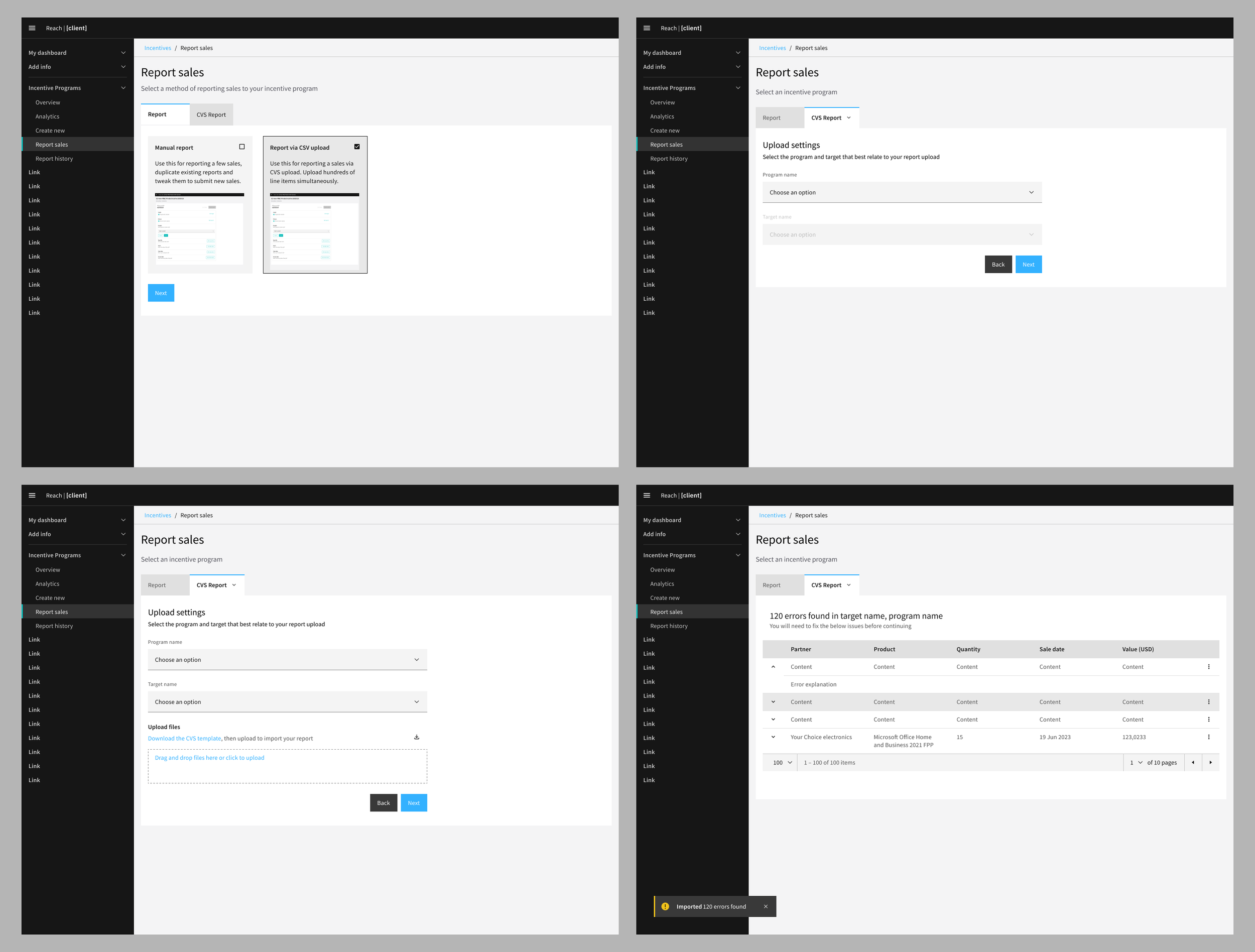
Incentive Reporting: Reports can be added manually or via CSV uploads
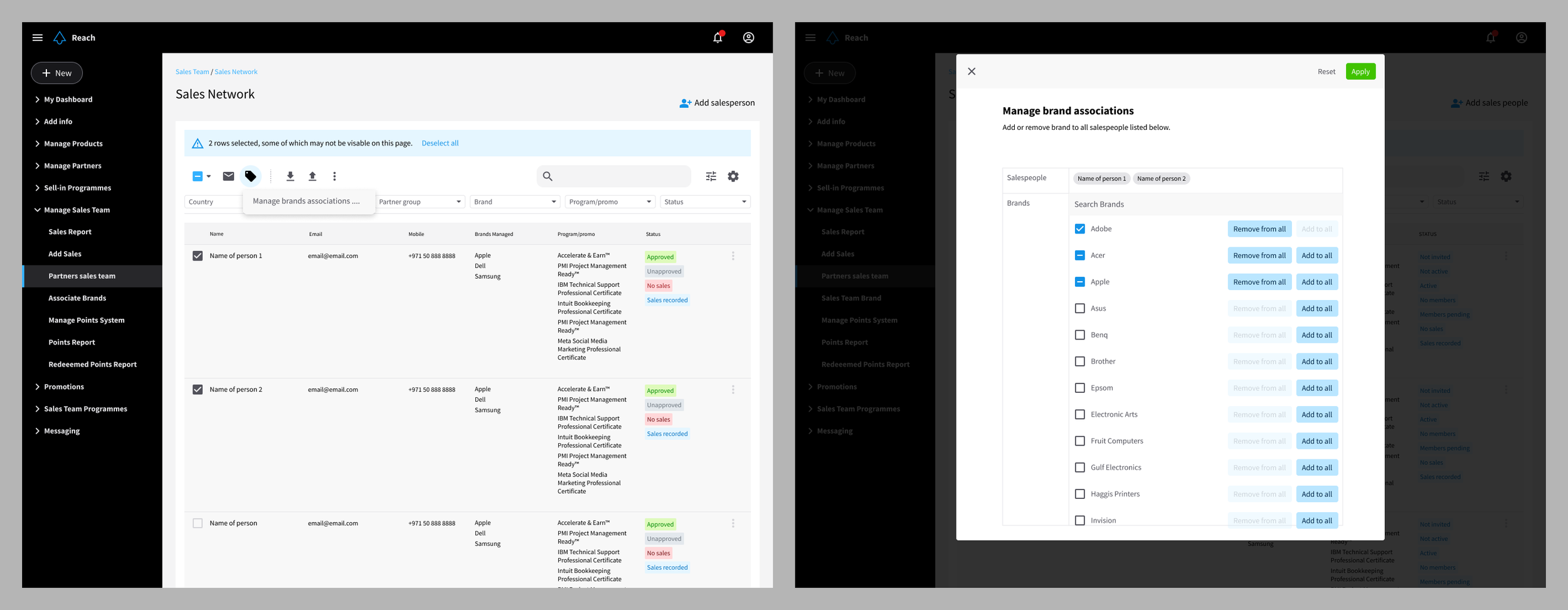
Associated a sales person with the brands that they can sell.